Many website owners start their online journey on a shared hosting plan. It is affordable, simple, and perfectly fine for a brand-new blog or a small portfolio. But as your website traffic grows, you might notice pages taking longer to load, unexpected crashes, or warnings from your hosting provider about resource limits. This is the exact moment most people realize they need a more powerful solution, leading them directly to VPS hosting.
If you are intimidated by server management, Linux commands, or technical jargon, you are not alone. Transitioning to a new hosting environment can feel overwhelming. This guide breaks down exactly what VPS hosting is, how it works behind the scenes, and how to determine if it is the right step for your growing online presence.
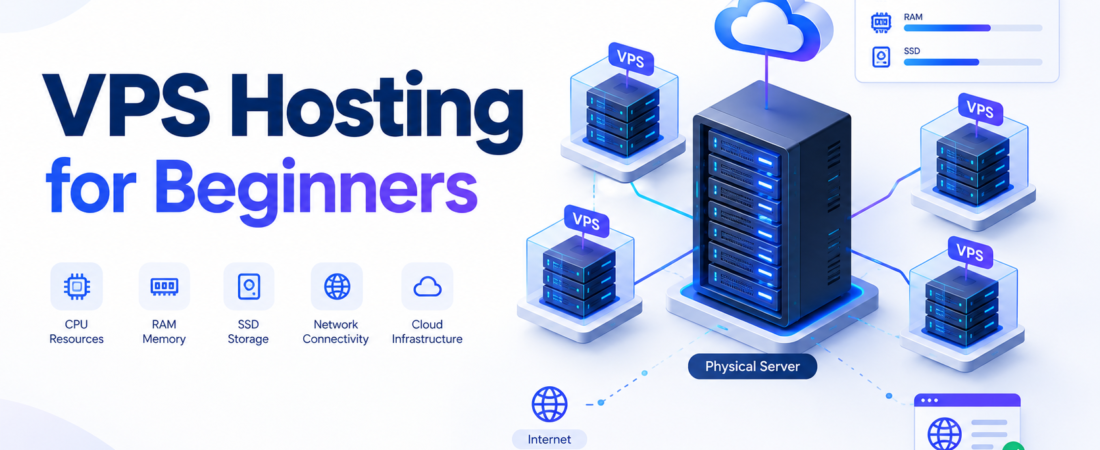
At its core, what is VPS hosting? A Virtual Private Server (VPS) is a secure, isolated hosting environment created by dividing a single physical server into multiple virtual servers. Unlike shared hosting where resources are scrambled together among hundreds of users, a VPS gives you a dedicated slice of server power—meaning your website’s performance is protected from the traffic spikes of other websites.
What Is VPS Hosting?
VPS stands for Virtual Private Server. To understand what this means, it helps to break down the terminology:
- Server: A powerful physical computer stored in a data center that stores your website files and delivers them to visitors’ browsers.
- Virtual: The server relies on software (virtualization) to divide the physical hardware into separate, distinct digital environments.
- Private: Your virtual environment is entirely isolated from other users on the same physical hardware. You do not share your allocated RAM, CPU, or storage.
The Townhouse Analogy
Think of shared hosting like living in a crowded dormitory. You share a single bathroom and kitchen with dozens of people. If one person uses all the hot water, everyone else suffers.
Dedicated hosting is like buying your own detached house. You own the land, the plumbing, and the electricity, but it is very expensive.
VPS hosting is like renting a modern townhouse. You still share the overarching property (the physical server) with a few neighbors, but you have your own locked front door, your own dedicated plumbing (RAM), and your own electrical breaker (CPU). What your neighbor does in their townhouse does not affect your utilities or your security.
Because you have your own “townhouse,” you are granted root or administrator access. This means you can install custom software, change security settings, and tweak the server to fit your exact needs.
How Does VPS Hosting Work?
The technology that makes a VPS possible is called virtualization.
A hosting company takes a robust physical server and installs a specialized piece of software called a hypervisor. The hypervisor acts as a smart traffic cop. Its job is to carve the physical server’s resources (CPU, RAM, storage, and network bandwidth) into multiple, independent virtual machines (VMs).
When you purchase a VPS, you are renting one of these virtual machines. The hypervisor assigns a strict limit to your resources. If another virtual machine on the same physical server experiences a massive surge in traffic, the hypervisor ensures that their traffic spike cannot bleed over and steal your allocated CPU or RAM.
Each virtual machine also runs its own operating system independently. Even if the physical server is running a specific underlying system, your VPS can run a completely different Linux distribution or a Windows environment. When you reboot your VPS, it only reboots your virtual environment, leaving the rest of the physical server and the other virtual machines completely uninterrupted.
VPS Hosting vs Shared Hosting
Understanding the leap from shared to VPS hosting is crucial for making the right purchasing decision.
| Feature | Shared Hosting | VPS Hosting |
| Resource Allocation | Shared pool; you compete with other users. | Dedicated allocation; resources are guaranteed. |
| Performance | Inconsistent; depends on neighboring websites. | Highly consistent; unaffected by other users. |
| Scalability | Very limited; requires moving to a new plan type. | High; you can usually upgrade resources with a few clicks. |
| Security & Isolation | Basic; a security breach on one site can occasionally impact the server. | High; complete isolation at the virtualization level. |
| Technical Control | Low; restricted to standard control panel settings. | Complete; full root/administrative access to the OS. |
| Management | fully managed by the hosting provider. | Choice of unmanaged (you do the work) or managed. |
| Typical Use Cases | New blogs, personal sites, low-traffic portfolios. | Growing businesses, ecommerce, custom applications. |
| Cost | Very low (often just a few dollars a month). | Moderate (varies based on resources and management). |
Shared hosting is ideal when keeping costs as low as possible is your primary goal and traffic is minimal. VPS hosting is the logical upgrade when reliability, speed, and security become critical to your business operations.
VPS Hosting vs Dedicated Hosting
If VPS hosting is a townhouse, a dedicated server is a private estate. Here is how they compare:
| Feature | VPS Hosting | Dedicated Hosting |
| Resources | A dedicated slice of a larger physical server. | 100% of the physical server’s hardware. |
| Isolation | Virtual isolation via a hypervisor. | Absolute physical isolation. |
| Control | Full root access to the virtual environment. | Full root access to the bare metal hardware. |
| Scalability | Extremely easy; resources scale virtually. | Harder; requires physical hardware upgrades. |
| Cost | Moderate and highly flexible. | High; usually a significant monthly investment. |
| Suitable Users | Mid-to-high traffic sites, developers, small-to-medium businesses. | Enterprise corporations, massive streaming sites, massive databases. |
Who Should Use VPS Hosting?
VPS hosting is a powerful tool, but it is not necessary for everyone. You should consider a VPS if you fit into one of these categories:
- Growing Websites: If your daily visitor count is steadily climbing and your site feels sluggish, a VPS provides the necessary engine upgrade.
- Ecommerce Websites: Online stores process secure transactions and rely on fast page loads to prevent cart abandonment. A VPS provides the stable, secure environment required for payment processing.
- Web Applications: Custom software often requires specific server environments, custom database setups, or distinct programming languages that shared hosting does not permit.
- Agencies and Developers: Web designers building sites for multiple clients can use a single robust VPS to host all their clients securely in separate, isolated environments.
Who does NOT need a VPS yet?
If you are launching your first WordPress blog, a temporary event page, or a local hobby site, a VPS is likely overkill. Stick with high-quality shared hosting until your traffic dictates the need for more resources.
VPS Resources Explained for Beginners
When shopping for VPS hosting, providers list plans based on technical specifications. Understanding these terms prevents you from under-buying or overpaying.
CPU / vCPU
The Central Processing Unit (CPU) is the brain of your server. In a VPS, this is often called a vCPU (virtual CPU), representing a slice of the physical server’s processing power. More cores mean your server can handle more complex tasks and database queries simultaneously without slowing down.
RAM
Random Access Memory (RAM) is your server’s short-term memory. It holds the data for the processes actively running on your site right now. If multiple people visit your site at the exact same moment, the server uses RAM to deliver the site to all of them. Too little RAM leads to server crashes; sufficient RAM ensures smooth multitasking.
SSD and NVMe Storage
Storage is the hard drive space where your website’s files, images, and databases live.
- SSD (Solid State Drive): The modern standard, infinitely faster than old mechanical hard drives.
- NVMe (Non-Volatile Memory Express): A newer, faster type of SSD that connects directly to the server’s motherboard, resulting in significantly faster data retrieval. If speed is a priority, look for NVMe.
Bandwidth
Bandwidth (or data transfer) is the amount of data allowed to flow between your server and your visitors over a given month. Every time someone loads a 2MB webpage, that is 2MB of bandwidth used. Video and image-heavy sites require high bandwidth limits.
IP Address
An IP address is the numeric location of your server on the internet. Shared hosting puts hundreds of sites on one IP. A VPS usually provides a dedicated IP address, meaning only your website uses it. This can benefit email deliverability and specific security configurations.
Root Access
Root access (in Linux) or Administrator access (in Windows) gives you absolute control over the server. You can install anything, delete anything, and change core system files. Beginners must be careful with root access—deleting the wrong file can instantly break the server.
Operating System
The operating system (OS) manages the server’s hardware and software. You will generally choose between Linux (open-source, highly popular for web hosting) and Windows (required for specific Microsoft technologies).
Managed vs Unmanaged VPS Hosting
This is the most critical choice a beginner will make.
| Feature | Managed VPS | Unmanaged VPS |
| Server Management | Provider handles backend server maintenance. | You handle everything via command line. |
| Updates & Patches | Provider updates the OS and core software. | You are responsible for all updates. |
| Security | Provider configures firewalls and malware scans. | You build and maintain your own security. |
| Technical Knowledge | Low to moderate. | High (requires Linux/SSH knowledge). |
| Support | Help with server-level errors and configuration. | Support only covers hardware/network failures. |
| Flexibility | High, but some extreme custom setups may be restricted. | Absolute freedom to configure anything. |
For beginners, Managed VPS is heavily recommended. While unmanaged VPS is much cheaper, it acts like a blank computer with no screen. You must connect via a terminal and type commands to install a web server, a database, and a control panel. If you do not have the time or desire to learn server administration, the extra cost of a managed plan pays for peace of mind.
Linux VPS vs Windows VPS
When configuring your VPS, you must select an operating system.
Linux VPS:
Linux is the industry standard for web hosting. It is open-source (free), highly secure, and consumes very few server resources. Popular distributions include Ubuntu, AlmaLinux, and Debian. It natively supports standard web technologies like PHP, MySQL, and Python. Unless you have a specific reason not to, you should choose Linux.
Windows VPS:
Windows Server is a commercial product, meaning a Windows VPS often costs slightly more to cover the Microsoft licensing fee. You only need a Windows VPS if you are running specific Microsoft applications, using ASP.NET frameworks, or relying on MSSQL databases.
How to Choose VPS Hosting as a Beginner
Do not buy the first plan you see. Use this checklist to evaluate VPS providers:
- Determine Management Level: Are you comfortable with a command-line interface, or do you need a managed plan with a visual control panel (like cPanel or Plesk)?
- Evaluate Resources: A good starting point for a standard website is 2 vCPU cores and 2GB to 4GB of RAM.
- Check Data Center Locations: Choose a provider with a data center physically close to your primary audience to ensure faster load times.
- Review Backup Options: Ensure the provider offers automated daily or weekly server snapshots.
- Analyze Support: Test their live chat. Do they offer 24/7 support? Is it in-house or outsourced?
- Check Scalability: Can you upgrade to the next tier of RAM and CPU without experiencing server downtime?
- Look for Security Features: Does the host provide built-in DDoS protection and a web application firewall (WAF)?
How Much Does VPS Hosting Cost?
VPS hosting cost is highly variable. The final price you pay depends on several factors:
- Management: Unmanaged VPS plans can start as low as a few dollars per month. Fully managed plans typically range from $30 to $80+ per month due to the human labor involved.
- Resources: More RAM and CPU cores directly increase the monthly fee.
- Licensing: If you choose a Windows OS or premium control panels like cPanel, expect add-on licensing fees.
- Billing Term: Most providers offer steep introductory discounts if you pay for 1, 2, or 3 years upfront.
Important Note: Always read the fine print regarding renewal pricing. An introductory rate of $15/month may renew at $45/month once your initial term expires.
How to Set Up a VPS for the First Time
If you choose a managed VPS, setup is largely automated and handled through a visual dashboard. If you are experimenting with an unmanaged Linux VPS to learn, the conceptual steps look like this:
- Deploy the Server: Select your OS (e.g., Ubuntu 24.04) in your host’s dashboard and launch the instance.
- Connect via SSH: Use a terminal (Mac/Linux) or a tool like PuTTY (Windows) to connect to your server using its IP address and your root password.
- Update the System: Run basic update commands (e.g.,
apt updateandapt upgradeon Ubuntu) to patch any immediate security vulnerabilities. - Create a New User: Operating as the “root” user is dangerous. Create a new user account with administrative privileges (sudo) for daily tasks.
- Secure with SSH Keys: Disable password logins and configure SSH keys for a highly secure connection.
- Configure the Firewall: Use a tool like UFW (Uncomplicated Firewall) to block all incoming traffic except for necessary ports (like HTTP, HTTPS, and SSH).
- Install Web Software: Install a web server (Nginx or Apache), a database (MySQL/MariaDB), and a scripting language (PHP). This is often called a LAMP or LEMP stack.
Disclaimer: Exact commands vary significantly based on your chosen Linux distribution. Running destructive commands without understanding them can permanently erase your server data. Always consult official documentation.
Common VPS Hosting Mistakes Beginners Make
Avoid these frequent pitfalls when transitioning to a VPS:
- Over-provisioning: Paying for 8 CPU cores and 16GB of RAM for a standard blog that only needs a fraction of that power.
- Using Root for Everything: Logging in as the root user for daily tasks means one typo can delete your entire file system. Always use a standard user with
sudoprivileges. - Ignoring Updates: On an unmanaged VPS, failing to run system updates leaves your server exposed to known security exploits.
- Skipping Backups: Assuming the hosting provider is backing up your data. Unless it is explicitly in your contract, backups are your responsibility.
- Exposing Unnecessary Ports: Leaving database ports open to the public internet rather than restricting them to localhost.
Is VPS Hosting Secure?
By its architectural nature, VPS hosting is highly secure. Because your environment is virtually isolated, a hacker cannot breach a neighboring virtual machine and easily jump into yours.
However, server security is a shared responsibility. The hosting provider secures the physical building, the network, and the hypervisor. On an unmanaged plan, you are responsible for the security inside the virtual machine. If you set a weak password, leave your firewall disabled, or fail to update your web applications, your VPS can absolutely be hacked. A VPS is a secure foundation, but you must build a secure house on top of it.
VPS Hosting for WordPress Beginners
WordPress is traditionally hosted on shared environments, but it thrives on a VPS.
As a WordPress site grows—especially if it uses heavy plugins like WooCommerce, LearnDash, or Elementor—it generates complex database queries that shared hosting struggles to process. A VPS provides the dedicated RAM needed to process these requests instantly. Furthermore, having full root access allows you to install advanced server-level caching tools like Redis or Memcached, which can drastically reduce page load times.
If your WordPress site takes more than three seconds to load, experiences database connection errors during traffic spikes, or relies on ecommerce transactions, moving to a managed VPS is highly recommended.
VPS Hosting for Small Businesses
For small businesses, a VPS acts as a versatile digital headquarters. Beyond simply hosting the public-facing business website, a VPS can be used to:
- Host internal company wikis or project management software.
- Run dedicated staging environments to test website updates before they go live.
- Host client websites if the business is a digital marketing or design agency.
- Manage private company databases and secure email servers.
It provides the necessary professionalism, uptime reliability, and data privacy that shared hosting cannot guarantee for business operations.
VPS Hosting and AI Applications
With the rapid rise of Artificial Intelligence, developers are frequently using VPS environments to build and test AI tools. A VPS can effectively host lightweight machine learning models, run automation scripts, or serve as the backend for applications connecting to external AI APIs (like OpenAI).
However, beginners should note that training large AI models requires massive amounts of processing power and specialized hardware, specifically GPUs (Graphics Processing Units). A standard, budget-friendly VPS relies on CPUs and is not equipped for heavy AI model training.
VPS Hosting and Google AI Overviews
When researching topics like server hosting, you may encounter AI Overviews in Google Search.
AI Overviews are AI-generated summaries that appear at the top of Google search results for specific queries. They pull information from multiple web sources to give searchers a quick, synthesized answer. It is important to understand that search appearance for AI Overviews varies based on the query, the user’s location, language, and Google’s internal systems.
There is no guaranteed way to rank in an AI Overview. However, creating helpful, well-structured content—using direct answers, clear descriptive headings, concise definitions, and factual comparisons (like the tables used in this guide)—helps search systems better understand and extract information. structuring your knowledge clearly is always best practice for both human readers and search technologies.
Frequently Asked Questions About VPS Hosting
What is VPS hosting for beginners?
VPS hosting is a way to upgrade your website’s server by giving you a dedicated slice of a larger physical server. It provides better speed, security, and stability than shared hosting because your resources are entirely isolated from other users.
Is VPS hosting difficult for beginners?
It depends on the management level. An unmanaged VPS requires command-line knowledge and can be very difficult for beginners. A managed VPS, however, uses simple visual dashboards (like cPanel) and is generally as easy to use as shared hosting.
Is VPS better than shared hosting?
Yes, in terms of performance, security, and reliability. However, it is also more expensive. It is “better” for growing sites, but shared hosting is still sufficient for brand-new, low-traffic websites.
How much RAM does a beginner VPS need?
For a standard website or a moderate WordPress blog, starting with 2GB to 4GB of RAM is generally recommended. You can easily scale up to 8GB or more as your traffic and database requirements grow.
Do I need Linux knowledge to use a VPS?
Only if you choose an unmanaged plan. If you purchase a fully managed VPS with a control panel, you can manage your websites, databases, and emails visually without ever typing a Linux command.
What is managed VPS hosting?
Managed VPS hosting is a service where the hosting provider takes care of the technical backend of your server. They handle operating system updates, server security, initial setup, and technical troubleshooting, saving you time and stress.
Is VPS hosting secure?
Yes, a VPS provides strong inherent security through virtualization isolation. However, actual security depends on keeping software updated, using strong passwords, and configuring firewalls correctly.
Can I host WordPress on a VPS?
Absolutely. WordPress runs exceptionally well on a VPS. The dedicated resources prevent database connection errors and allow for advanced caching setups, making it ideal for high-traffic WordPress sites and WooCommerce stores.
How much does VPS hosting cost?
Costs vary widely. Unmanaged developer VPS plans can cost $5 to $15 per month. Fully managed, beginner-friendly VPS plans typically range from $30 to $100 per month, depending on the allocated CPU and RAM.
Can I upgrade my VPS later?
Yes. One of the greatest benefits of a VPS is virtual scalability. If you need more RAM or CPU cores, you can usually upgrade your plan through your provider’s dashboard, often requiring only a quick server reboot.
What is root access?
Root access is the highest level of administrative privilege on a Linux server. It allows you to view, edit, or delete any file on the system, install custom software, and alter core configuration files.
What is the difference between VPS and dedicated hosting?
A VPS is a virtual slice of a single physical server, shared securely with a few others. A dedicated server means you are renting the entire physical machine exclusively for yourself. Dedicated hosting is much more powerful but significantly more expensive.
Final Verdict
Transitioning from shared environments to a Virtual Private Server is a major milestone for any website owner. By now, you should understand that a VPS provides a secure, isolated, and scalable environment that protects your website’s performance from the unpredictable traffic of others.
If you run a growing business, a bustling ecommerce store, or a web application, a VPS is likely the necessary next step. For beginners, choosing a managed VPS plan removes the steep technical learning curve, allowing you to focus on building your website rather than acting as a system administrator.
Compare your requirements, check the available VPS specifications, and choose a plan that matches your current needs rather than paying for resources you do not yet need.